How can your black-and-white footage gain colors that were never recorded? UniFab Colorizer AI predicts plausible colors from grayscale images using learned visual patterns. Video colorization adds an interpretation of the scene, rather than recovering a record of its original colors.
UniFab Colorizer AI leverages deep learning algorithms, trained on large-scale color video datasets, to automatically predict and generate colors for black-and-white videos.
The following sections explain how luminance and color prediction work, how the model evolved from single-scene to multi-scene processing, and what to inspect when reviewing colorized footage.
Knowledge Related to Video Colorization
A grayscale frame supplies luminance, or brightness information; UniFab Colorizer AI predicts plausible colors rather than identifying the historical colors of the objects shown. Use the reference-frame preview to choose a suitable color direction, and retain the original master alongside the colorized version.
Input Data Representation and Color Space Selection
Black-and-white images, represented as two-dimensional pixel matrices, have luminance values for each pixel typically ranging from 0 to 255, directly reflecting the distribution of light intensity in the grayscale image. Color images, on the other hand, are represented through three color channels—Red (R), Green (G), and Blue (B)—forming the RGB color space. The task of the network is to map grayscale images into the RGB space to achieve color restoration.
However, compared to the RGB color space, the Lab color space demonstrates significant advantages in image colorization tasks. The Lab color space decomposes an image into one luminance channel (L) and two chrominance channels (a and b), where:
- The L channel represents luminance (ranging from 0 to 100), accurately reflecting the light intensity information of black-and-white images;
- The a and b channels correspond to the color components green–red and blue–yellow, respectively, with values approximately ranging from -128 to +127.
This decomposition aligns with human vision, which is more sensitive to luminance than color. Preserving the L channel and predicting only the chrominance channels reduces the complexity of the mapping.
Network Architecture Design Strategies
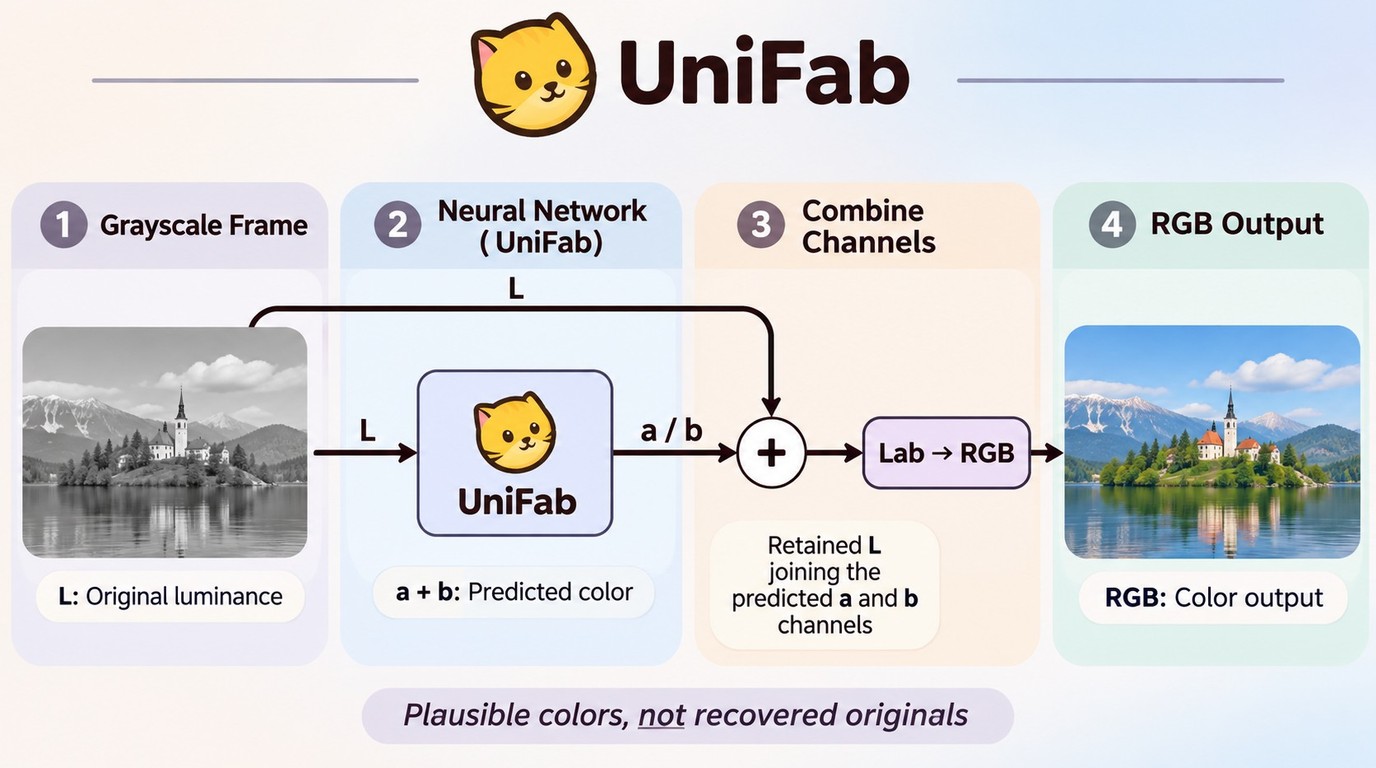
Based on the above analysis of color spaces, a typical image colorization network architecture includes:
- Input the L channel, which carries luminance information.
- Predict the a and b chrominance channels, which carry color information.
- Recombine the retained L channel with the predicted a and b channels.
- Convert the combined result to RGB and output color frames.
This design not only leverages the human visual system's sensitivity to luminance but also ensures a good balance between model capacity and training difficulty.
Network optimization and evaluation indicators
Colorization networks learn from large datasets of paired grayscale and color images, adjusting their predictions during training. To objectively evaluate the performance of colorization algorithms, various metrics have been introduced in academia, including:
Fréchet Inception Distance (FID)
FID measures the distribution difference between generated images and real images in a high-dimensional feature space. It is defined based on two sets of Inception network features (assumed to follow Gaussian distributions) with means and covariances (μr, Σ_r_) and (μg, Σ_g_), respectively:
Here, ∥⋅∥₂ denotes the Euclidean distance, and Tr represents the trace of a matrix.
Colorfulness Score (CF)
The Colorfulness Score reflects the richness of colors in an image. It is based on two components derived from the RGB image: _rg_ = _R_ − _G_ and _yb_ = 0.5 × (_R_ + _G_) − _B_. The score is calculated using their mean and standard deviation, defined as follows:
Substituting the overall color evaluation:
A higher Colorfulness Score indicates greater color richness, not greater historical accuracy.
User Study
A subjective evaluation based on user preferences, where real users provide feedback on the color quality of generated images through surveys or ratings. Despite its subjectivity, this metric offers intuitive and valuable insights for model improvement.
How UniFab Colorizer AI works
Local colorization runs on the computer. Enabling Scene Detection uses Local + Cloud processing and consumes FabCloud credits; Video Colorizer AI - FabCloud processes video entirely in the cloud without a local GPU.
Network Architecture Design
The UniFab model's network architecture is based on the classic UNet framework, integrated with a ResNet encoder to fully leverage the advantages of both, enhancing the effectiveness and efficiency of video colorization.
1.1 Overview of UNet Architecture
UNet is a classic image-to-image translation architecture, particularly well-suited for pixel-level tasks such as detail restoration and color mapping in video AI colorization. It processes spatial information within each frame while preserving image structure; temporal consistency mechanisms address color stability across frames.
- Encoder-Decoder Structure: The encoder progressively downsamples the input image to extract semantic features at multiple scales; the decoder progressively upsamples to restore the original image size, outputting the colorized image.
- Skip Connections: Features from corresponding encoder layers are directly passed to their matching decoder layers, effectively fusing shallow detailed features with deep semantic features, avoiding bottlenecks and improving detail restoration.
1.2 Choice of ResNet Encoder
The UniFab model employs ResNet (Residual Network) as the backbone feature extractor in the encoder part of UNet, for the following reasons and advantages:
- Deep Feature Learning Capability: ResNet introduces residual connections (shortcut connections) to solve the gradient vanishing problem in deep networks, enabling the stacking of more layers and capturing richer hierarchical features.
- Use of Pretrained Models: Leveraging ResNet pretrained on large-scale image classification datasets (e.g., ImageNet), UniFab can transfer general visual features to the colorization task, accelerating training convergence and improving model generalization.
- Multi-Scale Structure: Outputs from different layers of ResNet contain image features at various receptive fields, which are suitable for fusion in subsequent decoder and skip connection layers, ensuring precise detail restoration.
1.3 Decoder Module Design
The decoder restores features through transposed convolution (deconvolution) or upsampling combined with convolution:
- Progressive Upsampling: Gradually restores the spatial resolution from abstract feature maps back to the original input size.
- Skip Connection Fusion: At each corresponding layer, the decoder receives features from the encoder, fusing high-resolution shallow features with deep semantic features, resulting in output images with accurate structural contours and rich details.
- Multiple Convolutional Blocks: The decoder usually consists of several convolutional blocks (Conv + BatchNorm + ReLU), enhancing nonlinear expressive capacity and improving fitting for complex colors and textures.
This module is critical for capturing texture edges in the input grayscale image and their corresponding colors, effectively preventing colorization results from becoming overly blurred or distorted.
Color Space and Loss Functions
2.1 Color Space Selection
The UniFab model is designed for video colorization tasks based on the Lab color space, leveraging the advantages of this color space to enhance colorization performance:
- Separation of Luminance and Chrominance: The Lab space separates an image into a luminance channel (L) and two chrominance channels (a and b). The L channel reflects the grayscale information, while the a and b channels correspond to color components. UniFab retains the input image’s L channel as a luminance reference and only predicts the a and b chrominance channels through the network.
- Perceptual Uniformity: The Lab color space is designed to align with human visual perception of color changes, meaning that channel value changes correspond approximately linearly with perceived color differences. This perceptual uniformity contrasts with the nonlinear characteristics of the RGB space, facilitating stable learning of subtle color variations by the model and improving the naturalness and detail of color reproduction.
- Wide and Balanced Color Distribution: The a and b channels in Lab space cover color axes from green to red and blue to yellow, allowing description of a broad and balanced range of colors. This provides favorable conditions for diverse and rich color representations.
2.2 Loss Function Design
The UniFab model employs a multi-loss function optimization strategy, jointly considering pixel accuracy, structural semantics, and visual realism. The specific components include:
- Reconstruction Loss: Commonly uses L1 or L2 norms to measure the pixel-wise difference between the predicted chrominance channels and the ground truth colors. L1 loss tends to produce sharper image details and reduce color blurring; L2 loss is more sensitive to larger errors and focuses more on overall color correction. This loss ensures fundamental color accuracy and serves as the training foundation.
- Perceptual Loss: Extracts features from intermediate layers of a pretrained visual network (e.g., VGG) and calculates the difference between the predicted and ground truth images in a high-level semantic feature space. Perceptual loss goes beyond pixels to focus on image structure, texture, and semantic consistency, helping the model restore more natural and coherent color textures and improving visual quality.
- Adversarial Loss: In some versions, a Generative Adversarial Network (GAN) framework is introduced, where a discriminator distinguishes between generated and real images, forcing the generator (UniFab) to output samples with more realistic and diverse colors. Adversarial training enhances the vividness and detail richness of image colors, effectively eliminating monotonous and dull color transitions.
- Regularization Terms: To ensure color continuity and prevent excessive color bleeding or abnormal jumps, UniFab typically includes smoothness regularization or color constraints. These reduce abrupt color boundary changes and improve the natural transition effect of overall colors.
Training Process
The training process of the UniFab model is carefully designed to enhance the model’s color restoration capability, generalization performance, and stability in video colorization. It mainly includes the following key components:
3.1 Data Preparation
- Large-scale Color Image Dataset: Training relies on a rich collection of color images, which are first converted into grayscale images along with their corresponding color channels (e.g., the a and b channels in Lab space), forming input-output pairs. This approach ensures the model learns the mapping from grayscale information to color restoration.
- Diverse Data Sources Covering Wide Scenarios: The dataset includes various scenes such as natural landscapes, portraits, urban street views, and more, ensuring that the model can handle diverse image types and complex textures.
3.2 Self-supervised Learning Strategy
- Grayscale-to-Color Restoration Task: UniFab employs a self-supervised learning paradigm that requires no additional color annotations, relying solely on restoring color images from grayscale inputs. This significantly reduces dependence on manual labeling resources and facilitates acquisition of large-scale training data.
- Input Grayscale Images Contain Only Luminance Information: The model learns to predict chrominance channels, focusing the training objective and reducing problem dimensionality, which helps faster convergence and better results.
3.3 Progressive Training
- Initial Stage: The model is primarily trained using reconstruction loss to ensure it quickly grasps the basic mapping rules between luminance and color, achieving stable color restoration.
- Mid-to-Late Stage: Perceptual loss is introduced to encourage the model to optimize color and texture consistency at high semantic levels, improving visual quality. Combined with adversarial training, the model learns to produce outputs with greater realism and color diversity, avoiding monotone or distorted colors.
- Dynamic Adjustment of Learning Rate and Loss Weights: Learning rates and loss function weights are adjusted according to different training stages to balance convergence speed and result quality.
3.4 Data Augmentation
- Geometric Transformations: Includes random rotation, flipping, scale cropping, etc., enhancing the model’s ability to adapt to transformation invariance.
- Color and Lighting Augmentation: Adjustments to brightness, contrast, and saturation simulate diverse lighting environments, improving model robustness.
- Noise Addition: Adding random noise or blur increases tolerance to image quality variations.
Technical Advantages and Development Iteration of UniFab
Technical Advantages of UniFab Compared to General Technologies
- Multi-style Parallel Generation Architecture: UniFab adopts a multi-branch style embedding mechanism that integrates multiple style vectors at the encoder or decoder stages, enabling the network to simultaneously predict color mappings for multiple styles. This design shares computation across style branches rather than requiring a separate model for each style, producing multiple color directions instead of a single palette. The four current style choices are vivid cinema, muted documentary, warm nostalgia, and a customizable look.
- Adaptive Multi-scene Feature Fusion: UniFab leverages a multi-task learning strategy by training dedicated feature extraction submodules for different image scenes. Combined with self-attention mechanisms, it dynamically balances features from various scenes, enhancing the ability to capture complex textures and structures, and helping reduce unnatural colorization caused by feature conflicts across scenes.
- Enhanced Temporal Consistency Mechanism: An object changing hue across successive frames is a visible sign of color drift; inspect a moving object in the preview to assess its stability. The video colorization model uses temporal consistency regularization (Temporal Consistency Loss), combined with optical flow-based motion compensation techniques. This constrains inter-frame color variations when processing dynamic scenes. Paired with recurrent neural networks (RNN) or temporal convolutional networks (TCN) to capture temporal context, it helps reduce flicker and color drifting for smoother video color transitions. Stability within a shot concerns the same objects over time, while palette handling at scene cuts must accommodate a different setting.
Technical Development and Iteration Trajectory of UniFab
V1 and V2 refer to the model generations in this technical history. As of November 2026, their scene coverage and reference-frame strategies are summarized below.
| Model generation | Scene coverage | Reference-frame strategy |
|---|---|---|
| V1 model generation | Single-scene | a single reference frame |
| V2 model generation | Multi-scene | multi-reference-frame context fusion |
For clips with changing settings, scene segmentation and multiple reference frames let the model adapt its color context to each scene rather than carrying one reference across the entire clip.
The product’s separate 1.0, 2.0, and 3.0 feature labels describe RTX 50-Series support, color correction, and multi-scene colorization, respectively. These feature labels are distinct from the V1 and V2 model generations.
Version 1 (V1): Basic Single-scene Color Restoration
- Early UniFab focused on single-scene video colorization, mainly targeting relatively uniform video clips (e.g., single-person portraits or fixed environments). This version employed UNet architecture with a multi-style generation mechanism (style embedding module) to support multi-style outputs, allowing users to freely select between styles. However, V1’s color prediction is entirely based on a single reference frame, lacking the capability to recognize and handle multi-scene environmental changes in videos. It struggled with videos containing scene transitions or complex backgrounds, often leading to distorted or inconsistent colorization results.
Version 2 (V2): Multi-scene Intelligent Segmentation and Collaborative Colorization
- The core upgrade in V2 is multi-scene support through integrating an intelligent scene segmentation module combined with a multi-path feature network to dynamically detect and partition video content by scenes. Key technical aspects include:
- Multi-scene Video Segmentation: The model analyzes visual differences between adjacent video frames, statistically aggregating frame variations over a temporal window to automatically identify scene transition points. Based on this mechanism, the video is intelligently divided into multiple continuous, relatively stable scene segments. This assists the semantic segmentation network in focusing on feature extraction and color mapping for the current scene, helping reduce color confusion and abrupt color jumps during scene transitions.
- Collaborative Multi-branch Colorization Network: To handle different scene features, V2 designs a multi-branch decoder where each branch adapts to the color distribution of specific scene categories. Using attention mechanisms across spatial and channel dimensions, it dynamically fuses color features from various scenes, enhancing overall naturalness and detail presentation.
- Intelligent Reference Frame Selection and Fusion: By constructing a multi-reference-frame feature pool and a temporal similarity evaluation model, the system automatically selects reference frames that best match the style and content of the current frame for joint inference. This multi-reference-frame context fusion significantly improves color accuracy and temporal continuity.
- Enhanced Temporal Consistency: In the recursive updating of video colors, optical flow-based motion compensation strategies combined with temporal convolutional networks (TCN) help maintain smooth and natural color changes across frames, reducing flicker and color drift.
UniFab Colorization Workflow: Local Processing and FabCloud
- Import your footage. Launch UniFab Video Colorizer AI and import footage you are authorized to process. Keep the original master unchanged and work from a copy.
- Preview a reference frame. Generate a reference frame, a still image used to establish the color direction, and compare the four style previews. Choose a look that suits the footage rather than simply the most saturated result.
- Choose scene handling and processing. I recommend local processing when keeping footage on your computer is the priority. Enabling Scene Detection uses Local + Cloud processing and consumes FabCloud credits. If local GPU performance is the constraint, Video Colorizer AI - FabCloud processes the video entirely in the cloud without a local GPU.
- Process and review. Start processing, then review the output in motion before accepting it. Save the colorized version separately from the source master.
Preview Checks for Color and Motion
- Check whether skin tones look plausible.
- Inspect cuts between different scenes for abrupt palette changes.
- Look for color bleeding beyond object edges.
- Watch for excessive saturation and objects changing hue across frames.
If a result looks unsuitable, return to the reference-frame and style preview to reconsider the color direction. Further manual color grading belongs in a separate video editor, not in these UniFab preview controls.
Future Plans and Continuous Improvements
The following directions are future development goals for colorization and scene consistency.
- Global Color Anchoring: Address major tone shifts to achieve consistent global color control across frames.
- Multi-Character Identity Locking: Strengthen tracking and recognition of multiple characters to ensure stable and distinct colors for different roles.
- Intelligent Multi-Scene Adaptation: Optimize segmentation and color mapping of multi-scene videos to enhance natural color transitions during scene switches.
- Fusion of Local and Global Color Constraints: Integrate local detail and global style constraints to reduce color drifting and abrupt changes.
- Enhancement of Color Detail Representation: Improve the model’s ability to capture fine textures and subtle tones to boost restoration accuracy.
- Acceleration of Inference and Model Lightweighting: Optimize model structure and inference efficiency to support real-time applications on a wider range of devices, with separate resolution enhancement addressed by the four models in the UniFab Video Upscaler technology analysis alongside colorization.
Our goal is to develop more efficient and user-friendly black-and-white colorization models to help users easily and effectively restore black-and-white videos. We aim to improve inference efficiency, color detail, and consistency within shots and across scene changes.
You are welcome to join our forum to participate in discussions and stay updated. 👉 Community Link:
If you have topics of interest or models you want to follow, please leave a message on the forum. We will seriously consider your testing and evaluation suggestions and regularly publish professional technical reviews and upgrade reports.
Thank you for your attention and support of UniFab!
UniFab Video Colorizer AI FAQ
Does a higher Colorfulness Score mean more accurate colors?
No. The Colorfulness Score measures color richness, not whether an object’s colors match its historical appearance; a vivid result can look plausible without matching the original colors.
Can I try UniFab on my own footage before purchasing?
Yes. UniFab Video Colorizer AI provides 3 watermark-free uses for evaluating the feature on your own footage. Choose a representative clip with faces, movement, and scene changes so you can judge the result. FabCloud processing uses credits.
Do I need a powerful GPU for video colorization?
Local processing uses your computer’s hardware. If your local GPU is the constraint, Video Colorizer AI - FabCloud runs colorization entirely in the cloud without a local GPU, providing another route for processing your footage.
Can I use colorized footage in a commercial project?
A UniFab Video Colorizer AI license permits commercial use of processed videos. Access and process only authorized source footage, do not redistribute it without permission, and follow applicable law and platform terms. The permissions needed depend on your specific use case.